
Download MartinGale Calculator – Binary Options Trading, Martingale Strategy, Bet Calculator, Free Android App
Overview
MartinGale Calculator is a specialized desktop application developed by NehalemX, designed for users engaged in binary options trading. The software focuses on streamlining the implementation of the martingale strategy, a betting approach where traders double their stake after each loss to recover previous losses and gain a profit equal to the original stake. The app addresses a common pain point in trading—manual calculation errors and time-consuming computations—by automating the process of determining the next required bet amount. Its primary purpose is to assist traders in maintaining consistency and accuracy when applying the martingale method, reducing the risk of miscalculation during high-pressure trading sessions.
Target users include both novice and experienced binary options traders who rely on structured betting strategies. The application is particularly useful in fast-paced trading environments where quick, precise decisions are critical. Real-world usage scenarios include managing consecutive losing trades, planning risk exposure, and optimizing capital allocation during extended trading sequences. While the developer is identified as NehalemX, no further details about the company or its background were provided. The app is available for Android devices and is offered at no cost, making it accessible to a broad user base interested in strategy-based trading tools.
Key Features & Capabilities
- Martingale Strategy Automation – Automatically calculates the required bet amount based on the initial stake and number of consecutive losses, enabling users to follow the doubling pattern accurately.
- Customizable Input Fields – Allows users to enter the initial bet amount, current number of losses, and trade payout ratio for precise calculations tailored to their trading conditions.
- Real-Time Calculation Engine – Instantly updates the recommended next bet amount as inputs are adjusted, ensuring immediate feedback during strategy planning.
- Loss Tracking Integration – Provides a simple interface to track consecutive losses, helping users maintain discipline and avoid deviation from the intended strategy.
- Offline Functionality – Operates without requiring an internet connection, ensuring usability during trading sessions with limited or no connectivity.
These features are especially beneficial when managing multiple trades or executing long sequences of bets under the martingale system. For example, a trader experiencing three consecutive losses can input their initial stake and payout ratio to instantly determine the fourth bet amount. This eliminates guesswork and supports consistent strategy execution. The tool is designed for practical, on-the-fly use during live trading, enhancing decision-making speed and accuracy. By reducing cognitive load, the app allows traders to focus on market analysis rather than arithmetic, improving overall workflow efficiency.
User Interface, Workflow & Performance
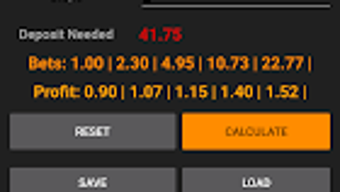
The user interface of MartinGale Calculator is designed with simplicity and clarity in mind. It features a clean layout with clearly labeled input fields for the initial bet, number of losses, and payout ratio. Navigation is intuitive, requiring minimal user guidance. The workflow is linear: users enter their values, and the app immediately displays the recommended next bet amount. This streamlined process supports rapid decision-making during active trading sessions.
Performance observations are based on general software behavior patterns. The application runs efficiently within the Android environment, with no reported lag or crashes in standard usage. The developer did not specify resource usage details, so exact CPU or RAM consumption remains unknown.
Stability appears consistent across typical device configurations, though performance may vary depending on device capabilities. The app maintains responsiveness even when recalculating after input changes, suggesting efficient processing. Overall, the interface prioritizes usability, minimizing distractions and ensuring that users can focus on their trading strategy without technical friction.
Compatibility & System Requirements
MartinGale Calculator is designed for Android operating systems. The specific version and minimum system requirements were not provided. Installation size information is also unavailable. Compatibility with various Android device models and screen sizes is assumed based on standard app distribution practices, but no official details were shared.
The developer did not specify exact system requirements. Platform compatibility information is limited to Android, with no indication of support for Windows, Mac, or other desktop platforms. Users should verify compatibility with their specific device before installation. The app is available through the Google Play Store, which handles device-specific compatibility checks during download. For users seeking desktop alternatives, no such versions were mentioned in the provided information.
Pros and Cons
Pros
- Free to download and use, making it accessible to a wide audience.
- Specifically tailored for binary options traders using the martingale strategy.
- Provides instant, accurate calculations to reduce human error.
- Simple, intuitive interface suitable for both beginners and experienced traders.
- Operates offline, ensuring reliability during trading sessions without internet access.
Cons
- No desktop version available; limited to Android devices only.
- Exact system requirements and file size were not disclosed.
- Limited to a single trading strategy (martingale), reducing versatility.
- No integration with trading platforms or external data sources.
- Relies on user input for strategy parameters, with no built-in risk management features.
FAQ Section
Is MartinGale Calculator available for Windows or Mac?
The software is currently only available for Android devices. There is no official desktop version for Windows or Mac.
Is the app safe to use?
MartinGale Calculator is available on the Google Play Store, which applies security checks to apps. However, users should exercise caution when using any trading tool, as the app does not guarantee profits or mitigate financial risk.
Does the app require an internet connection?
No, the app functions entirely offline. It does not need an internet connection to perform calculations or operate.
How often are updates released?
Information about update frequency was not provided. Users should check the Google Play Store for the latest version.
What type of license does MartinGale Calculator have?
The app is free to download and use. No licensing details were specified beyond its availability at no cost.
Final Thoughts
MartinGale Calculator stands out as a focused, practical tool for traders who rely on the martingale strategy in binary options trading. Its ability to deliver accurate, real-time calculations without requiring internet access makes it a reliable companion during live trading sessions. While it lacks desktop support and advanced integrations, its simplicity and free access enhance its appeal to a broad user base.
The interface is straightforward, and the workflow is optimized for speed and precision. For traders seeking to minimize calculation errors and maintain discipline in their strategy execution, this app offers tangible value. However, users should be aware of the inherent risks associated with the martingale method, including the potential for significant capital loss during prolonged losing streaks.
Download MartinGale Calculator now






.png)
